Quickstart: Agent
Give your AI agent a wallet and make its first autonomous payment.
This tutorial walks you through creating an AI agent that can autonomously pay for API resources using USDC on Solana. By the end, your agent will fetch data from a paywalled endpoint and handle payment automatically.
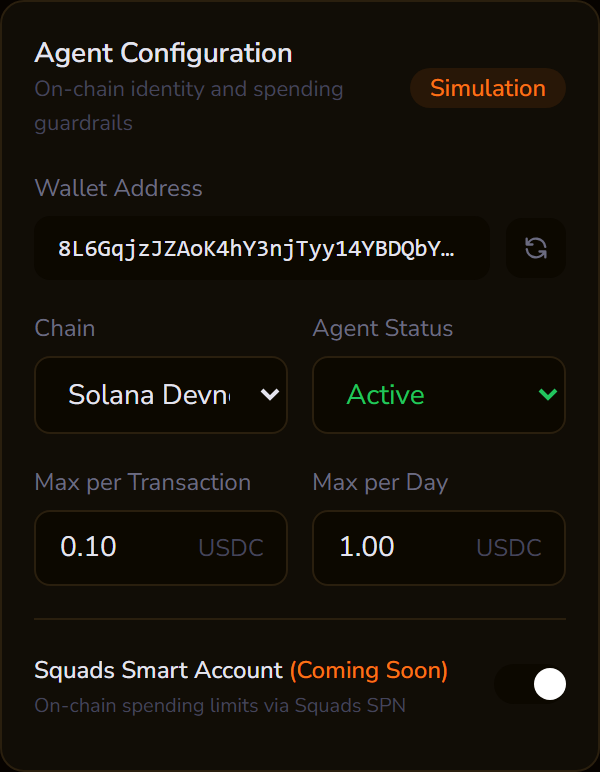
New to x402 payments? Try the interactive demo first to see the payment flow in action before writing code.
Prerequisites
- Node.js 22+ (
node --version) - Solana CLI (optional, for key generation):
sh -c "$(curl -sSfL https://release.anza.xyz/stable/install)" - Devnet USDC from the Circle faucet
Step 1: Generate a Solana keypair
If you already have a devnet keypair, skip to Step 2.
Using the Solana CLI:
solana-keygen new --outfile agent-keypair.json --no-bip39-passphrase
solana address -k agent-keypair.json
Or generate one programmatically:
import { generateKeyPair } from "@solana/kit";
const keypair = await generateKeyPair();
Save the base58-encoded private key. You'll need it as AGENT_SOLANA_KEY.
Step 2: Fund the wallet
Your agent needs both SOL (for transaction fees) and USDC (for payments).
SOL (for gas):
solana airdrop 2 <your-agent-address> --url devnet
USDC (for payments): Go to the Circle faucet, select Solana, Devnet, USDC, paste your agent address, and request tokens.
Step 3: Install the SDK
mkdir my-agent && cd my-agent
npm init -y
npm install @pincerpay/agent
npm install -D tsx typescript
Step 4: Write the agent
Create agent.ts:
import { PincerPayAgent } from "@pincerpay/agent";

async function main() {
  const agent = await PincerPayAgent.create({
    chains: ["solana-devnet"],
    solanaPrivateKey: process.env.AGENT_SOLANA_KEY!,
  });

  console.log(`Agent address: ${agent.solanaAddress}`);
  console.log(`Chains: ${agent.chains.join(", ")}`);

  // Fetch from a paywalled endpoint
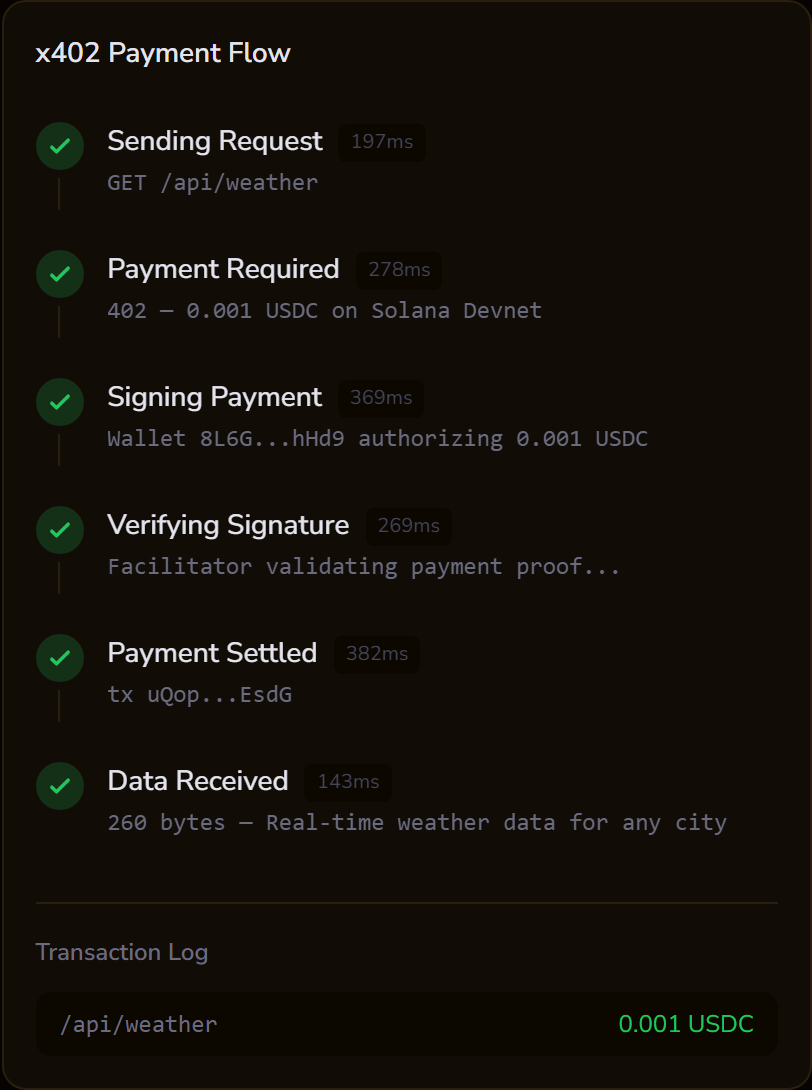
  // The SDK handles the 402 → sign → submit → retry flow automatically
  const merchantUrl = process.env.MERCHANT_URL ?? "http://localhost:3001";
  const response = await agent.fetch(`${merchantUrl}/api/weather`);

  if (response.ok) {
    const data = await response.json();
    console.log("Received:", JSON.stringify(data, null, 2));
  } else {
    console.log(`Failed: ${response.status} ${response.statusText}`);
  }
}

main().catch(console.error);
Step 5: Run it
Point the agent at a running merchant (see the Merchant Quickstart):
AGENT_SOLANA_KEY=your_base58_private_key npx tsx agent.ts
Expected output:
Agent address: 7xKXtg2CW87d97TXJSDpbD5jBkheTqA83TZRuJosgAsU
Chains: solana-devnet
Received: {
  "temperature": 72,
  "conditions": "sunny",
  "location": "San Francisco",
  "timestamp": "2026-03-02T12:00:00.000Z"
}
Your agent just made its first autonomous payment.
Step 6: Add spending policies
Spending policies prevent your agent from overspending. They're enforced client-side before any transaction is signed.
Update agent.ts:
const agent = await PincerPayAgent.create({
  chains: ["solana-devnet"],
  solanaPrivateKey: process.env.AGENT_SOLANA_KEY!,
  policies: [
    {
      maxPerTransaction: "100000",  // 0.10 USDC max per payment
      maxPerDay: "1000000",         // 1.00 USDC max per day
      allowedChains: ["solana-devnet"],
    },
  ],
});

Policy options
| Option | Type | Description |
|---|---|---|
maxPerTransaction |
string |
Max USDC per single payment (base units, 6 decimals) |
maxPerDay |
string |
Max USDC per rolling 24-hour window |
allowedMerchants |
string[] |
Only pay these wallet addresses |
allowedChains |
string[] |
Only pay on these chains |
USDC base units reference
| Human | Base Units |
|---|---|
| $0.001 | "1000" |
| $0.01 | "10000" |
| $0.10 | "100000" |
| $1.00 | "1000000" |
| $10.00 | "10000000" |
Step 7: Trigger a policy violation
Try fetching an endpoint that costs more than your maxPerTransaction:
const agent = await PincerPayAgent.create({
  chains: ["solana-devnet"],
  solanaPrivateKey: process.env.AGENT_SOLANA_KEY!,
  policies: [
    {
      maxPerTransaction: "500",  // 0.0005 USDC, lower than the 0.001 price
    },
  ],
});

try {
  await agent.fetch("http://localhost:3001/api/weather"); // costs 0.001 USDC
} catch (error) {
  console.error(error);
  // Error: Payment of 1000 exceeds maxPerTransaction of 500
}
The SDK throws before signing any transaction, so no USDC is spent.
Managing policies at runtime
// Update the policy
agent.setPolicy({
  maxPerTransaction: "1000000",  // 1.00 USDC
  maxPerDay: "10000000",         // 10.00 USDC
});

// Check current policy
const policy = agent.getPolicy();
console.log(policy);

// Check how much has been spent today
const { date, amount } = agent.getDailySpend();
console.log(`Spent ${amount} base units on ${date}`);
Multi-chain agents
Agents can hold keys for multiple chains. The SDK picks the right chain based on the merchant's 402 response:
const agent = await PincerPayAgent.create({
  chains: ["solana-devnet", "base-sepolia"],
  solanaPrivateKey: process.env.AGENT_SOLANA_KEY!,
  evmPrivateKey: process.env.AGENT_EVM_KEY!,
});

console.log(`Solana: ${agent.solanaAddress}`);
console.log(`EVM: ${agent.evmAddress}`);
Troubleshooting
"insufficient balance": Fund the agent wallet with devnet USDC via the Circle faucet.
"policy violation": The payment exceeds your spending policy. Increase maxPerTransaction or maxPerDay.
Transaction times out: Solana devnet can be slow. The facilitator retries automatically, but you may need to wait up to 30 seconds.
"Failed to derive Solana keypair": Ensure AGENT_SOLANA_KEY is a valid base58-encoded Solana private key (not hex, not a path to a JSON file).
Next Steps
- Interactive Demo to experiment with spending policies, error scenarios, and Smart Accounts
- Agent SDK Reference for the full API
- Weather Agent Example for a complete agent with spending policies
- Merchant Quickstart to build your own paywalled API
- Testing Guide for devnet setup and transaction verification